


Funimate Video Editor & Maker
4.3153.20K Reviews
App Specs
- Version
- 14.0.9
- Updated On
- License
- Free
- Downloads
- 50,000,000+
- Developer
- Pixery Bilgi Teknolojileri
- Categories
- Video Players & Editors
- Platform
- Android, iOS
Screenshots

 Analysis by AppCompare
I judge a mobile editor by how quickly I can get from a clip in my camera roll to something I’m happy to share. Funimate Video Editor & Maker is aimed at playful, effects-led edits rather than painstaking, frame-by-frame production. That focus makes it approachable when I want a short video with a clear visual style, though it also means it is not the tool I’d choose for every editing job.
What to expect from the editing pace
The first few minutes feel friendly: the interface does not bury a new user under a wall of controls, and I could start experimenting without first learning a complex editing vocabulary. That is useful when an idea is still loose, such as wanting to give a quick clip more energy before posting it. The speed advantage is mainly in getting started; choosing an effect and deciding whether it actually suits the footage still takes a little judgement.
For a simple edit, I’d begin with the clip’s purpose rather than scrolling through effects at random. A close-up, a dance move, and a scenic shot can each respond differently to the same treatment. I get better results when I try one visual direction, preview it, and then make a deliberate change instead of piling on effects just because they are available.
When a short edit turns into a bigger project
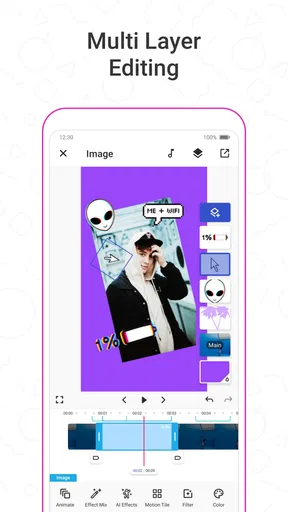
Funimate’s effects, transitions, custom-effect creation and music tools give me room to build a more distinctive result than a basic trim-and-filter workflow. The trade-off is that every added layer of style asks for another decision: does the transition help the movement, does the effect distract from the subject, and does the audio still feel in time? A lively edit can be satisfying, but more elements do not automatically make a stronger video.
One practical workflow is to settle the clip sequence and overall mood before fine-tuning the effects. I would then check the transitions in context, because a transition that looks impressive on its own can interrupt the rhythm between two shots. Finally, I’d listen through with the intended soundtrack rather than judging the video only while looking at the screen. That last pass can reveal whether the edit feels cohesive or merely busy.
Reliability is also about the finishing pass
For me, a dependable editing routine includes checking the whole result before sharing, not just admiring the most polished moment. I would watch the beginning, middle and ending, paying attention to abrupt changes in pace and whether the sound remains appropriate throughout. This is especially worthwhile for effect-heavy edits, where a detail that looks fine in a still preview may feel distracting once the clip is moving.
I also prefer to keep a project’s creative direction simple enough that I can revise it without losing track of what I wanted. If a version feels cluttered, removing one effect may improve it more than adding another. That kind of restraint is not a special tool feature; it is a useful way to get more reliable results from a creative editor built around visual experimentation.
Worth Reading Before You Choose

Flipboard Shows What News Apps Must Do Beyond the Feed

Switching to Android Auto Means Rethinking Your Driving Routine

Google Calendar Makes a Crowded Week Easier to Manage

Ludo King Makes the Most of the Minutes Between Plans

Baby Panda World Brings Quick Play to Modern Phones, but Its Game Library Feels Busy

ESPN’s Live Game View Makes Following Close Games Easier
Choosing it for the phone you have
Any editor that works with video and layered visual choices can feel different depending on the footage and the device. I would start with a short clip and a modest edit before committing to a longer project, especially if I’m using an older or less capable phone. That small test helps me decide whether the workflow feels comfortable for my own clips, without assuming every edit will behave identically.
Funimate is available as a free app, with optional in-app purchases ranging from $1.49 to $69.99 per item. I’d treat the free experience as the sensible place to learn the interface and see whether its style suits me before spending anything. The app is rated Teen, so that age guidance is worth considering when deciding whether it is appropriate for a younger user.
As a video player and editor from Pixery Bilgi Teknolojileri, it sits in a category where many alternatives emphasize general-purpose trimming, captions, or more conventional timelines. Funimate’s appeal is the more expressive, effects-first approach. I’d lean toward a straightforward editor for a clean informational clip or precise, restrained assembly; I’d reach for Funimate when visual character and playful transitions are part of the point.
People often ask whether an editor like this is useful if they are new to making videos. In my view, yes, if the goal is to experiment and learn by trying effects on short clips. It is less suitable if you want a quiet, minimal workflow and rarely use visual treatments. I’d also ask myself whether I want to create for sharing and inspiration or simply make a quick practical cut, since those needs favor different kinds of tools.
Another useful question is how to avoid an edit that looks overworked. I’d choose one main visual idea, use transitions where they support the motion, and make the soundtrack serve the clip rather than compete with it. Custom effects are most valuable when they contribute a recognizable personal touch; they are not a requirement for every project. That approach keeps experimentation enjoyable while making the finished video easier to follow.
For an everyday example, imagine I’ve filmed a few short moments from an outing and want to turn them into a lively recap. I’d pick the strongest shots first, arrange them around a simple beginning and ending, then test a transition or effect on the moment that benefits most from extra energy. I’d add music only after the visual sequence feels coherent and watch the full edit once before sharing. The point is not to decorate every second, but to give the best moments a little more personality.
First Impressions and Interface
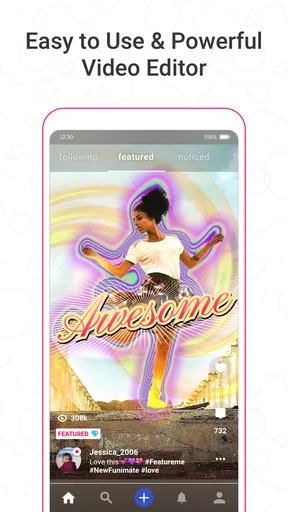
When I first opened Funimate Video Editor & Maker, I was pleasantly surprised by its user-friendly interface. You’re not overwhelmed with too many options, which is a relief if you’re like me and prefer things straightforward. The layout is clean, with easy navigation that makes you feel right at home even if you’re new to editing.
The app is designed to be intuitive. I found myself navigating through the menus with ease, and within minutes, I was already testing out some edits. It’s clear that the developers put a lot of thought into making sure users can jump right in and start creating without a steep learning curve.
Features That Stand Out
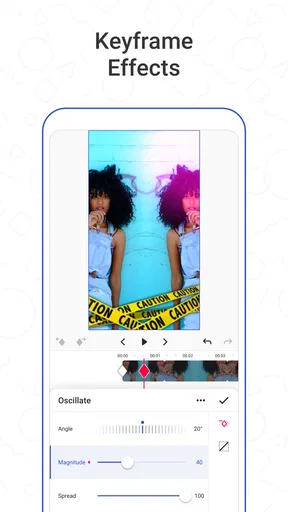
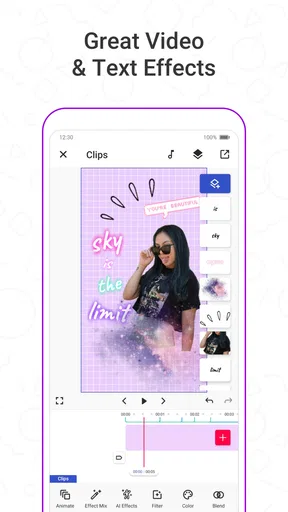
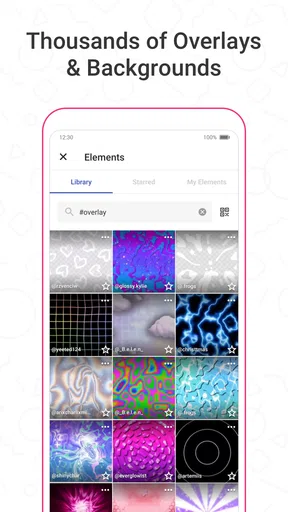
Now, let’s talk features. What I love most about Funimate is its diverse range of effects. We're talking over 100 advanced video effects that can transform your clips from basic to eye-catching in seconds. Whether you’re into music videos, slow-motion clips, or something a bit more artsy, there’s something for everyone.
One of the coolest features I discovered is the ability to create your own effects. Yes, you heard that right! You get to unleash your creativity and design effects tailored to your style. This gives a personal touch to your videos, making them truly unique.
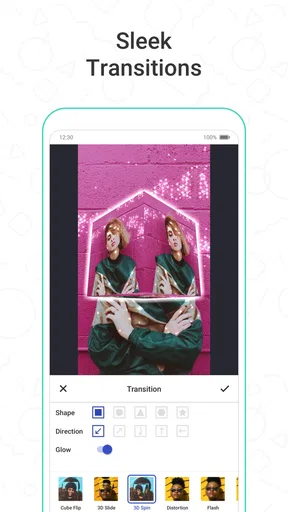
Another impressive feature is the video transition options. Seamless transitions can make or break a video, and Funimate offers a plethora of choices. Whether you want something smooth and subtle or bold and dramatic, you’ll find a transition that fits your vibe.
Community Spirit and Collaboration
Funimate isn’t just a video editor; it’s a vibrant community of creators. The app encourages collaboration through its community features. You can share your creations, get feedback, and even collaborate with other users. It’s a fantastic way to learn, get inspired, and push your skills to the next level.
I found the community aspect incredibly motivating. Seeing what others are creating and being able to interact with them added an extra layer of excitement to my editing journey. Plus, it’s a great way to make new friends who share your passion for video editing.
Music and Audio
No video is complete without the right soundtrack, and Funimate makes sure you’re covered on that front. The app offers a vast library of music and sound effects. Whether you’re in the mood for something upbeat or a more mellow tune, you’re bound to find something that matches your video’s mood.
Adding music is a breeze, and the syncing options ensure your edits hit the right beats, making your videos even more engaging. And if you have your own tracks, Funimate lets you import them easily, giving you full control over your audio experience.
How it fits into a regular editing routine
The app has been available since August 19, 2016, and its current version is 13.5.0. It has an average rating of 4.4 from around 1.1 million ratings, with roughly 154,000 written reviews and over 50 million installs. Those figures suggest that many people have tried it, but they don’t tell me whether its creative style matches a particular person’s needs. I’d use the workflow itself as the deciding factor.
At home, I might use Funimate to turn a few clips from a hobby, a performance, or a casual day out into something with more visual energy. For a school project or a straightforward update where clarity matters more than flair, I’d keep effects restrained and consider whether a simpler editor would get me to the result with fewer choices. That distinction matters: Funimate’s creative options are a strength when I want them, but they can be unnecessary for a basic cut.
If I’m sharing work with other creators, the community can make the app feel more rewarding than an editor that ends at export. I’d still approach feedback as inspiration rather than a rulebook; another person’s style may not fit my footage or taste. Looking at other edits can help me notice pacing and effect choices, while building a consistent look of my own takes practice.
On a practical level, I’d keep a copy of important original clips outside the editing process and avoid treating an unfinished idea as the only version of a project. That is a sensible habit for mobile editing generally, particularly when I’m trying several creative directions. It gives me freedom to experiment without feeling that I have to preserve every choice made along the way.
There is also a difference between a quick social edit and a project that needs exact control. Funimate’s approachable presentation and expressive tools make it inviting for the first kind. If I need a highly methodical production workflow, detailed control over every cut, or a restrained result with minimal decoration, I would compare it with a more timeline-focused alternative before settling in. The best choice depends less on which editor has the longest feature list and more on how much control I actually need.
Performance verdict
My overall impression is that Funimate is best approached as a creative playground with a clear purpose: make short videos more personal through effects, transitions, audio and community inspiration. I would not judge its usefulness by how many treatments I can fit into one edit. A quick, considered result is often more effective than a sequence where every clip competes for attention.
The app is a good fit for beginners who want to explore visual editing, and for experienced hobbyists who enjoy a lively effects-led style without needing every project to feel like a formal production. Someone who mainly needs clean trims, a quiet interface, or highly controlled editing may be happier with a simpler or more traditional alternative. I’d start with a small project, see whether the creative process clicks, and decide from there.
Final Thoughts
All in all, Funimate Video Editor & Maker is perfect for anyone looking to get creative with their videos. It’s packed with features that cater to both beginners and seasoned editors. The app’s user-friendly design, coupled with a supportive community, makes it a must-try for anyone eager to elevate their video editing game.
If you’re ready to turn your video ideas into reality, I highly recommend giving Funimate a shot. Explore, create, and most importantly, have fun with your editing journey. Trust me, once you start, you won’t want to stop!
Pros
- User-friendly interface for quick edits.
- Wide range of effects and transitions.
- Regular updates with new features.
- Strong community for sharing projects.
- Supports multiple video formats.
Cons
- In-app purchases can get expensive.
- Ads can be disruptive during editing.
- Limited advanced editing features.
- Can be resource-heavy on some devices.
- Occasional crashes on older phones.
FAQs for Funimate Video Editor & Maker
What features does Funimate Video Editor & Maker offer?
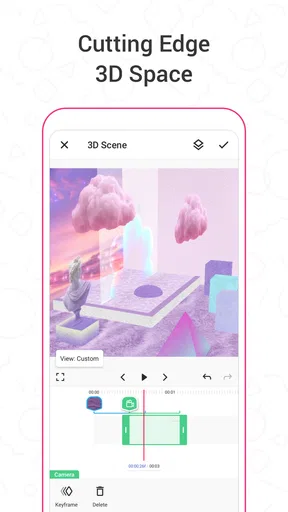
Funimate Video Editor & Maker provides a variety of features including advanced transitions, custom animations, and real-time effects. Users can also access a library of music, text overlays, and video merging tools. The app offers tools for creative editing, perfect for crafting engaging videos for social media platforms.
Is Funimate Video Editor & Maker free to use?
Funimate offers both free and premium versions. The free version includes basic editing tools and effects, while the premium version unlocks additional features such as exclusive effects, unlimited video length, and ad-free usage. Users can choose a subscription plan that best fits their needs.
Can Funimate be used by beginners?
Yes, Funimate is user-friendly and designed for both beginners and advanced users. The intuitive interface and easy-to-understand tools make it accessible for those new to video editing, while still offering advanced features for experienced creators looking to enhance their videos.
Is Funimate compatible with all devices?
Funimate is available for both Android and iOS devices. Users should ensure their device meets the app's system requirements for optimal performance. The app is regularly updated to support the latest operating systems and devices, ensuring compatibility across a wide range of smartphones and tablets.
Does Funimate Video Editor & Maker require an internet connection?
An internet connection is required to download the app and access online features such as the music library and sharing options. However, basic editing features can be used offline. For the best experience, including downloading updates and accessing cloud features, a stable internet connection is recommended.


